Stop Trying to "Manage" Your Time

After a long, hectic day, have you ever caught yourself thinking:
"I was insanely busy today, but I didn't actually get anything important done."
You've tried to-do lists. You've bought planners. You've downloaded every productivity app you could find. At first, it feels like things might finally change — installing the new app, organizing your tasks, filling in a pretty template. Then a week passes and you're right back where you started. Why does it always end up the same way?
Cal Newport says the problem isn't the tools. It's the absence of a system.
The Real Problem, According to Cal Newport
Cal Newport is a computer science professor at Georgetown University, best known for Deep Work and So Good They Can't Ignore You, and a prolific thinker on productivity. He's spent years digging into a single question: "Why do some people get important things done while others — equally busy — don't?"
His answer is disarmingly simple. You can't manage time. Everyone gets the same 24 hours. What we actually need to manage is where our attention and energy go. And what makes that possible is a good system.
Most people mistake a productivity problem for a tool problem. They go hunting for a better app, a prettier planner, a more elaborate template. But tools cannot substitute for a system. Even the best tool, without a system, becomes just another pile of lists.
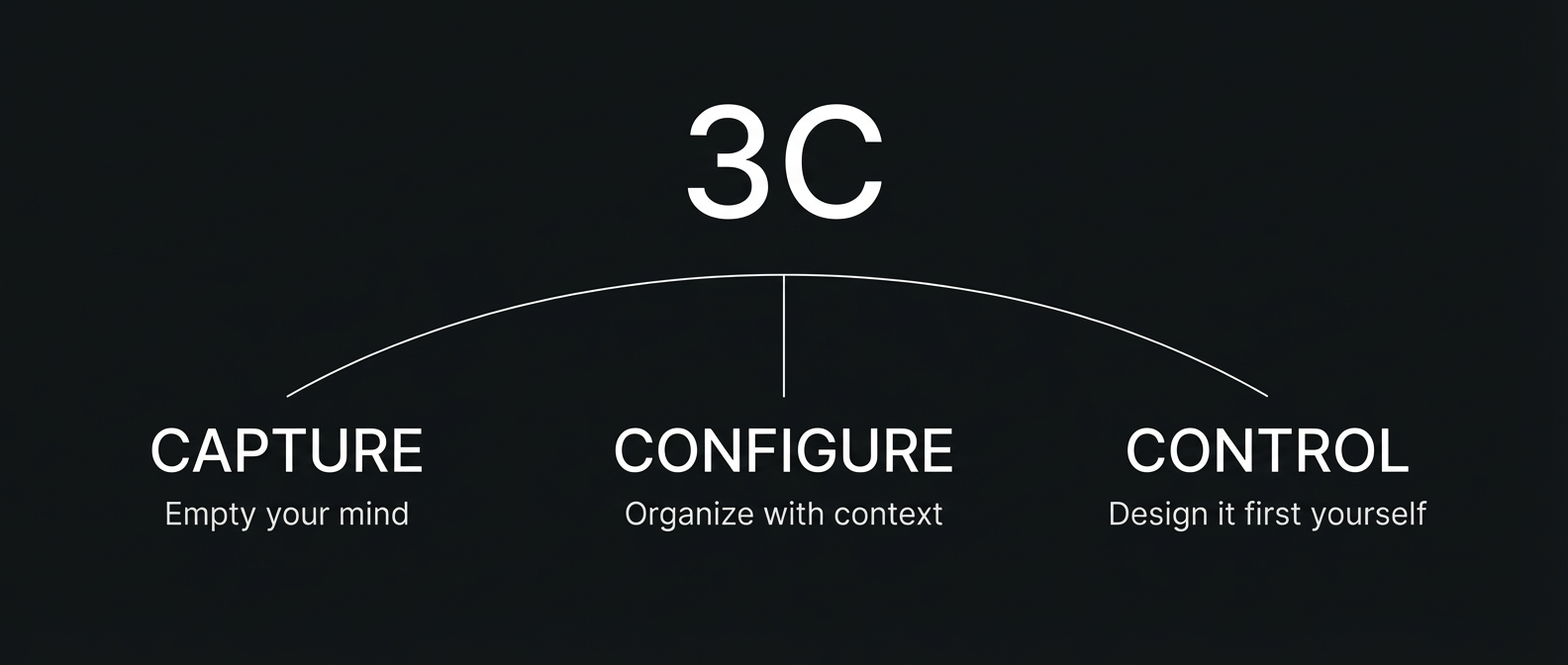
Newport's conditions for a good system come down to three things: Capture, Configure, and Control — the "3C Framework."
Capture — You Have to Empty Your Head First
The first condition is Capture.
Things you need to do, ideas that pop up, things you need to pass along to someone. Keeping all of that inside your head means your brain is constantly looping: "Don't forget this, don't forget this." That loop is a drain on energy — the effort spent trying to remember is energy stolen from the work that actually needs your focus.
Psychology has a name for this: the Zeigarnik Effect. Unfinished tasks stay in an activated state in the brain. That's why, in the middle of a meeting, over dinner, or when you're lying in bed trying to fall asleep, your brain ambushes you with "oh wait, I still need to do that."
The fix is simple: get what's in your head out and into a trusted system. The key word is trusted. You need the certainty that you'll actually revisit it later before your brain will let go of it. If you write something down somewhere you're unlikely to ever look again, your brain will keep holding on.
Newport himself has shared that he uses Trello and a plain text file called working_memory.txt. The specific tool doesn't matter. What matters is the habit of everything going into the system at least once — and the trust that you'll actually look at it.
Configure — Capturing Isn't Enough
The second condition is Configure. This is where most people fall short.
Even if you capture everything faithfully, your to-do list can balloon past 100 items with ease. And when you're faced with 100 items, you freeze. Where do I start? When is this due? Who does this depend on? Suddenly, looking at the list itself becomes stressful.
Newport emphasizes two things. First, organize information well. Second, keep related information together. It's not about listing tasks — it's about structuring them by role and project, and attaching the necessary context to each item.
Say you have an item that reads: "Send Derek the program code." On its own, the next time you look at it, you'll waste time reconstructing what that even meant. But if it sits under the relevant project board, alongside the related links, you can pick it up and move without any mental reloading.
Newport manages his own Trello boards by role — writer, professor, researcher. Each board has columns like "to be processed" and "waiting to hear back from," so a single glance at the list tells him exactly what state everything is in.
Control — Stop Living Reactively
The third and most essential condition is Control.
Think about how most days actually go. A Slack notification pops up and you check it. Emails pile up and you respond. Someone asks you something and you deal with it. And just like that, the day is over. This is what Newport calls a reactive day — busy from beginning to end, yet none of the things you actually wanted to get done got touched.
Control is about reversing that pattern. It means planning before the moment arrives. Designing your own time before anything else can claim it.
Newport recommends practicing this across three time horizons:
- Quarterly: Get a big-picture view of what really matters this quarter. Know when deadlines are, and which projects deserve your focus.
- Weekly: Based on the quarterly plan, decide what you're doing this week. Sketch a rough picture of which day each item will get done.
- Daily: Design today's time blocks yourself. Get specific about what you'll do with the gaps between meetings.
When these three layers align, your day stops being something that happens to you and becomes something you've chosen. The quarterly plan shapes the weekly plan, and the weekly plan shapes today's time blocks.
3C and Why the Calendar Sits at the Center
When you actually try to live by Newport's 3C framework, you quickly arrive at one unavoidable insight: everything has to eventually land on a calendar to get done.
Captured tasks, configured projects — none of it becomes real until it's on your actual time. The time-blocking at the heart of Control is impossible without a calendar. A calendar isn't just a place to record appointments; it's a design tool for deciding where your attention goes and for how long.
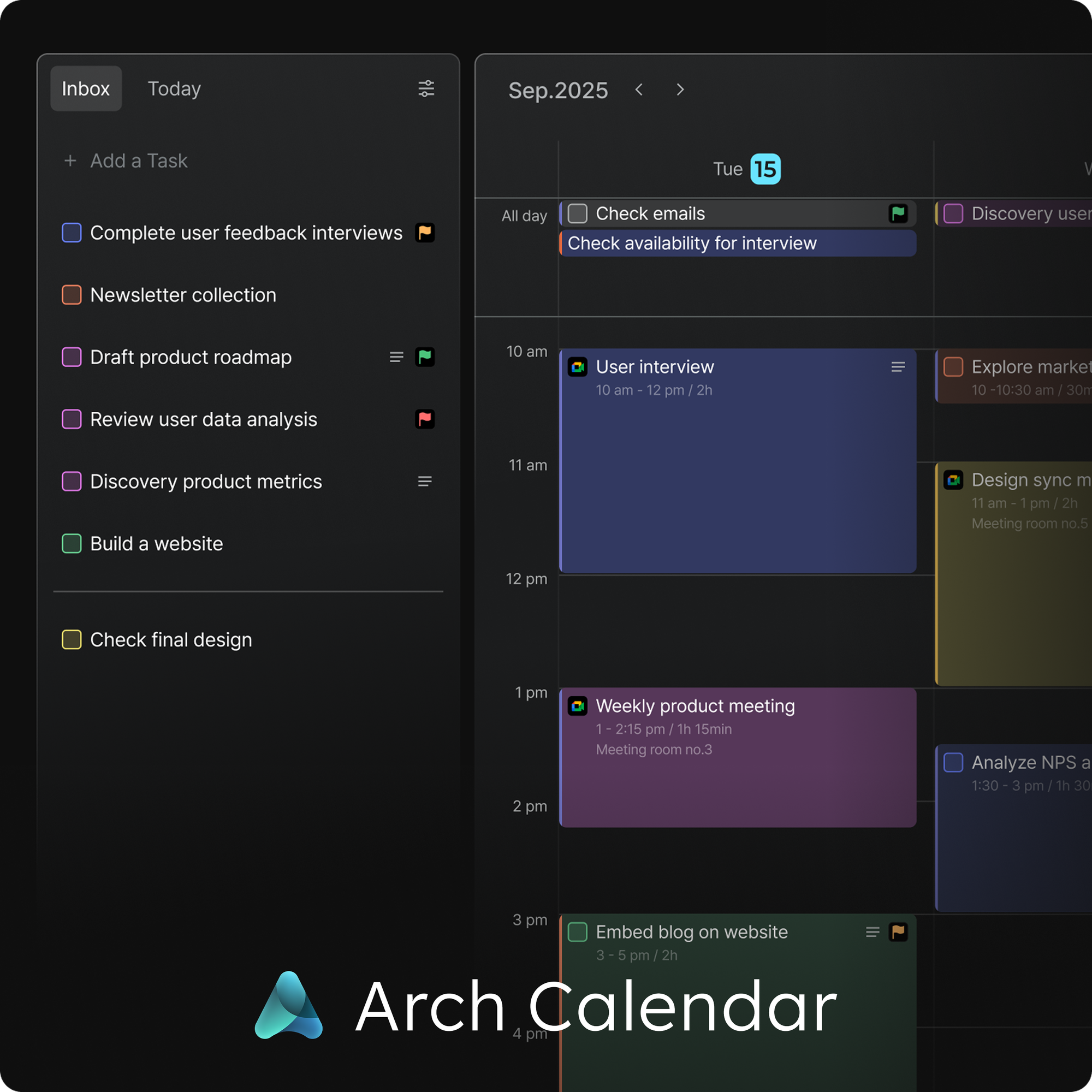
Interestingly, the way Arch Calendar is built maps directly onto this flow.
- Inbox: A place to capture tasks the moment they arise → Newport's Capture
- Calendar placement: Moving tasks onto real time slots, turning them into an execution plan → Control via time-blocking
- Space: Connecting tasks by project and role, keeping context organized → Configure's structure
It's essentially what Newport built by combining Trello, Google Docs, text files, and a calendar — brought into a single screen. No switching between tools; the full loop of capture → plan → organize stays connected and unbroken.
Putting 3C Into Practice, Starting Today
Enough theory. Here's what you can do right now.
1. Capture: Pick one inbox and stick to it.
Things that come to mind, things you spot in email, things that surface in meetings — all of it should flow into one place. Whether it's an app or a notebook, the point is one. When your inboxes are scattered across multiple places, your brain holds onto that uneasy feeling that something might be living somewhere else, even if you've been dutifully recording things. Try it for just one day: the moment something comes up, put it in that one place immediately.
2. Configure: Organize by role.
Don't lump everything into one list. Simply sorting by role and context — Work, Personal, Project A — makes priorities dramatically clearer. Add even a single line of context or a relevant link next to each item, and you'll save yourself from the mental overhead of reconstructing what it meant the next time you see it.
3. Control: Design tomorrow's day tonight.
Spend 10 minutes before you leave work and block out tomorrow's calendar yourself — including what you'll do in the gaps between meetings. Newport's point is that the decision of what to do should happen in advance, not in the moment. That way, when the time comes, you can start without hesitation.
Being Busy and Doing Good Work Are Two Different Things
There's a line from Newport that sticks with me:
"Once the system is in place, you can clear an entire Thursday afternoon and go walk in the woods to think."
The goal of managing your time isn't to do more. It's to do the things that matter well — and to genuinely own the time that's left. With a system in place, an empty calendar doesn't feel like a threat; it feels like possibility. Nothing will slip through the cracks, and you can be fully present with whatever you're doing right now.
Capture. Configure. Control. When all three are in place, your day finally starts to move the way you intended. Not by finding a better tool — but by building a system. That, Newport says, is where it actually begins.